
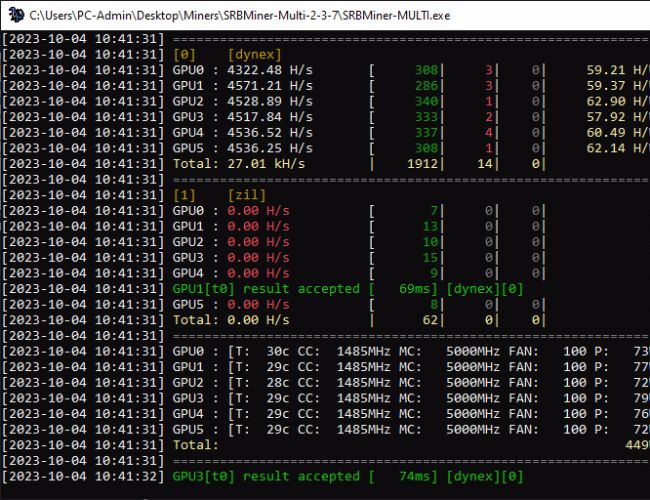
Up until recently the OneZeroMiner was the preffered miner for Nvidia GPU miners mining Dynex (DNX) as the fastest performing miner, however the SRBMiner-Multi software used mostly by AMD miners has recently brought back Dynexsolve support for Nvidia in the version 2.3.6 (performance was slower than OneZeroMiner) and in the just released update to version 2.3.7 things got more interesting. The latest SRBMiner-Multi 2.3.7 (2.5% dev fee DNX, 0% on ZIL) is now faster on Nvidia compared to OneZeroMiner (3% dev fee) and also has lower developer fee and even supports dual mining of Dynex and Zilliqa, so a bit of an extra advantage apart from the higher performance and lower fee. Windows miners would also like the fact that with SRBMiner-Multi they can also take advantage of the GPU clock offset actually working to further lower the power usage as opposed to OneZeroMiner’s one not working under Windows. This means that you can further reduce power usage with SRBMiner-Multi 2.3.7 while also getting higher hashrate and some extra profit from mining ZIL every hour or so for a bit.
So, if you are looking for something that you can GPU mine with profit currently and hold and mine long term then you should definitely take a look at DNX and give it a go. And another tip, get a local Dynex wallet to mine at as most mining pools supporting DNX mining won’t allow you to mine on an exchange address, and it is better to keep the mine coins in a wallet than on an exchange anyway. ZIL dual-mining might be a bit of a challenge with some of the pools not allowing you to dual-mine if both coins are not on their list of supported pools coins (K1Pool with the largest ZIL hashrate at the moment for example) and you might have some trouble using some other pools as well, though Crazypool seems to be working just fine for dual mining DNX and ZIL in our experience, so you might want to give it a go.
Example of SRBMiner-Multi command line for DNX + ZIL mining:
SRBMiner-MULTI --disable-cpu --algorithm dynex --pool eu.dnx.mineradnow.space:18000 --mallob-endpoint https://gomallob.mineradnow.space/ml --wallet DNX_WALLET --password WORKER_ID --zil-enable --zil-pool eu.crazypool.org:5005 --zil-wallet ZIL_WALLET.WORKER_ID --zil-esm 2 --gpu-cclock0 1485 --gpu-mclock0 5001 --gpu-coffset0 200 --zil-cclock 1000 --zil-moffset 1000
Make sure to change DNX_WALLET and ZIL_WALLET to your own wallet addresses and WORKER_ID to your mining rig’s id. For DNX a GPU clock of around 1485 is a good choice and memory at 5001, ZIL core clock of around 1000 (for 3000 series Nvidia) and +1000 on video memory is a good option for ZIL mining. Depending on your GPU an offset of 200-300 should be the sweet spot, so you might want to start from 200 and increase it to around 300 to see what works for you – the higher the value the lower the power usage, but GPUs might become unstable.